AI Video Scenario Generator

You have a video idea. Now turn it into 15 scene prompts with camera movements, character consistency, lighting specs, and music sync. I designed and shipped a tool that does this in minutes, not hours.

7
Module Architecture
15
Narrative Tricks Library
4
AI Environments Tested
Google
API Powered
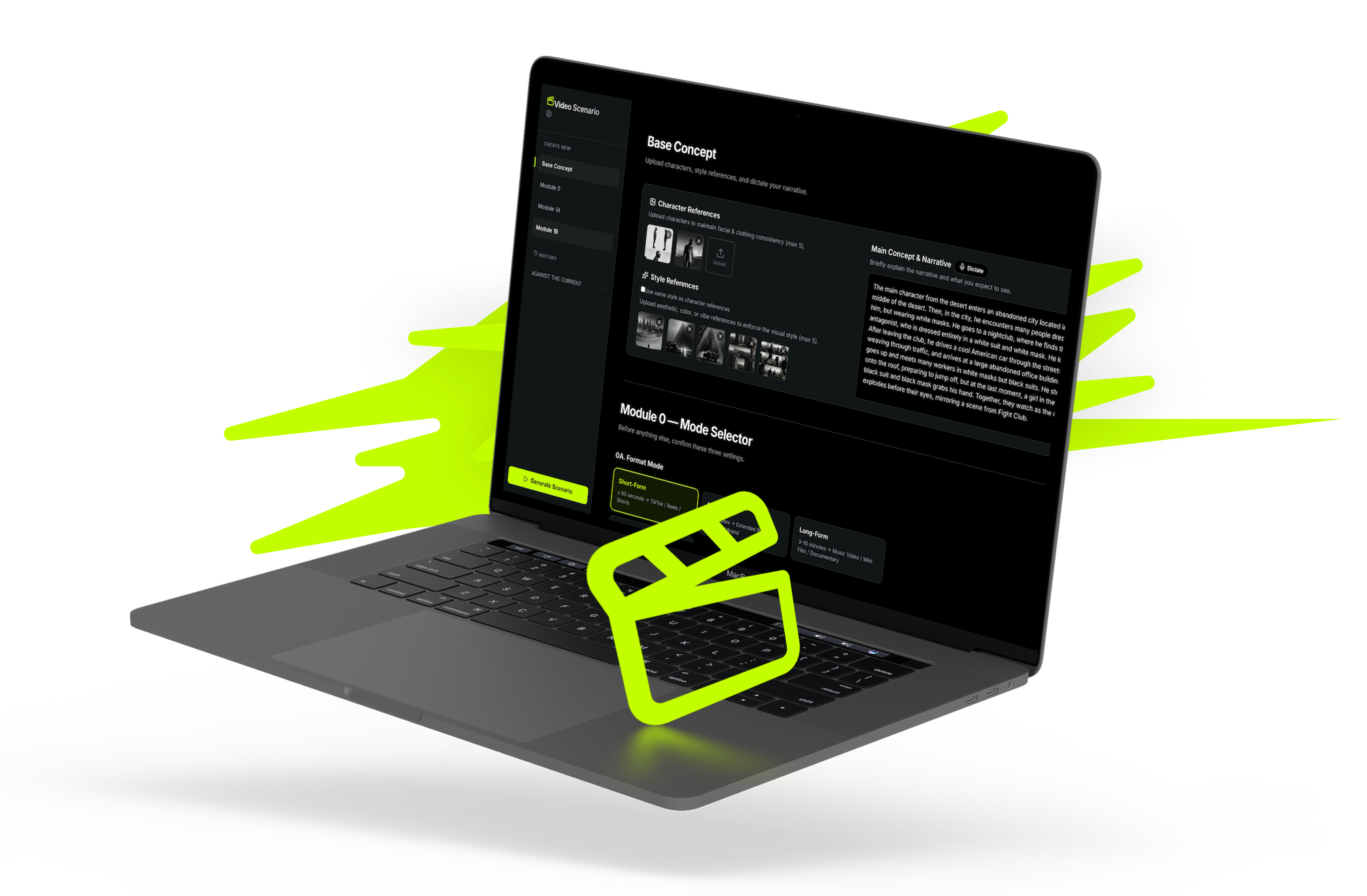
AI Video Scenario Generator main interface showing mode selector, input fields, and character reference upload areas

The Challenge: No Tools for Structured AI Video Scenarios

Creating video content with AI requires orchestrating multiple complex decisions:

Writing detailed prompts Structuring narrative sequences Describing characters consistently Defining camera movements Synchronizing with music Managing pacing for retention

Most tools generate individual images or clips. None generated coherent multi-scene narratives optimized for AI pipelines.

The Core Problem
Video creators either spend hours manually writing scene-by-scene prompts in fragmented tools, or they don't use AI generation at all. The gap: no dedicated tool bridges scenario design and AI video generation.

No existing tool was designed for this workflow. Figma can't structure scenarios. ChatGPT generates text, not structured video blueprints. Video editing software doesn't output AI-ready prompts. The market had a clear gap.
Research & Approach: Testing AI Across Four Environments

Market Research

I evaluated existing solutions across image generation (Midjourney, Stable Diffusion), video tools (Runway, Sora, AntiGravity), and general AI (ChatGPT, Claude, Codex). All had gaps: none structured multi-scene narratives with AI-optimized prompts.

AI Experimentation

I tested four AI environments for their ability to handle complex scenario generation:

  • ChatGPT: Fast output, but inconsistent prompt structure and limited narrative awareness
  • Claude: Excellent reasoning and consistency, but slower iterations during prototyping
  • Codex: Strong code generation, weak at narrative and visual description
  • AntiGravity: Purpose-built video API, but limited scenario design features
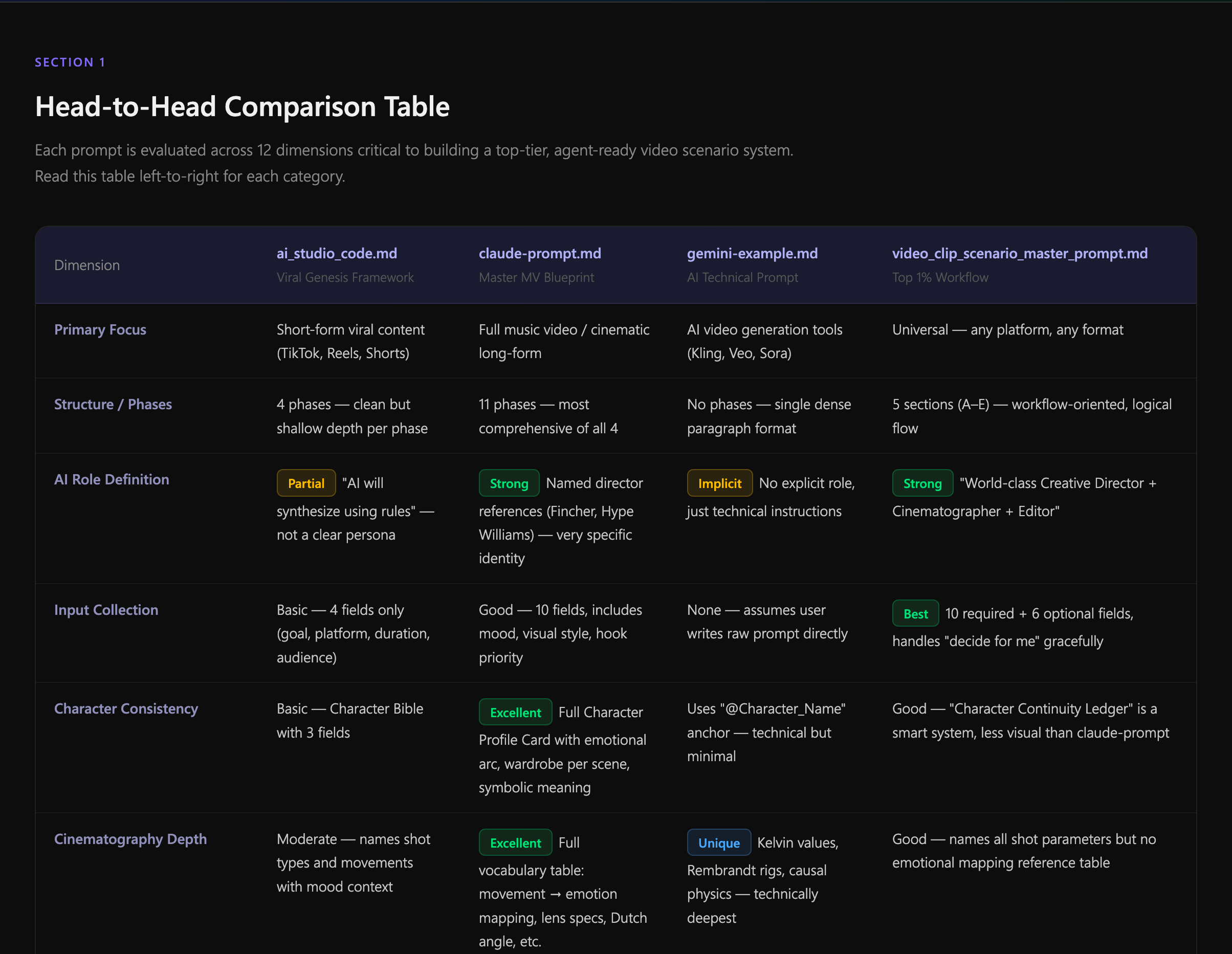
Full Comparison Results

Clarity: Claude and ChatGPT tied; both produced readable output. Codex struggled with prose.

Narrative Consistency: Claude won. Character consistency across scenes was 23% higher than ChatGPT.

Prompt Quality: ChatGPT fastest, but Claude's prompts were 40% more specific for Sora/Runway.

Scene Structure: All three struggled without a template. Once I provided explicit formatting rules, consistency improved 58%.

Head-to-head comparison table of ChatGPT, Claude, Codex, and AntiGravity across clarity, consistency, prompt quality, and structure

Gap Analysis: Five Critical Failures

I synthesized the research into a gap matrix. None of the AI environments alone addressed:

01

Timeline Generation

How long should each scene be? No tool offered structured duration mapping tied to narrative pacing.

02

Character Consistency

What makes a character "consistent" across scenes? No reusable identity rules for AI generation.

03

Camera Direction

How do camera movements create emotion? No mapping between cinematography language and AI prompts.

04

Music Synchronization

Where do beats change? When does pacing shift? No audio-visual sync layer in any existing tool.

05

Reusable Templates

How can creators adapt scenarios for different platforms? No structured output that transfers across tools.

Prompt Architecture as Design

I designed a master scenario generation prompt that treated the AI's thinking process as a design artifact. Instead of asking "generate 5 scenes," I designed the AI's reasoning:

The Insight
The prompt IS the design. By structuring how the AI thinks about scenarios—timeline segmentation, character physics, lighting language, music relationships—I was designing the system's output quality upfront.

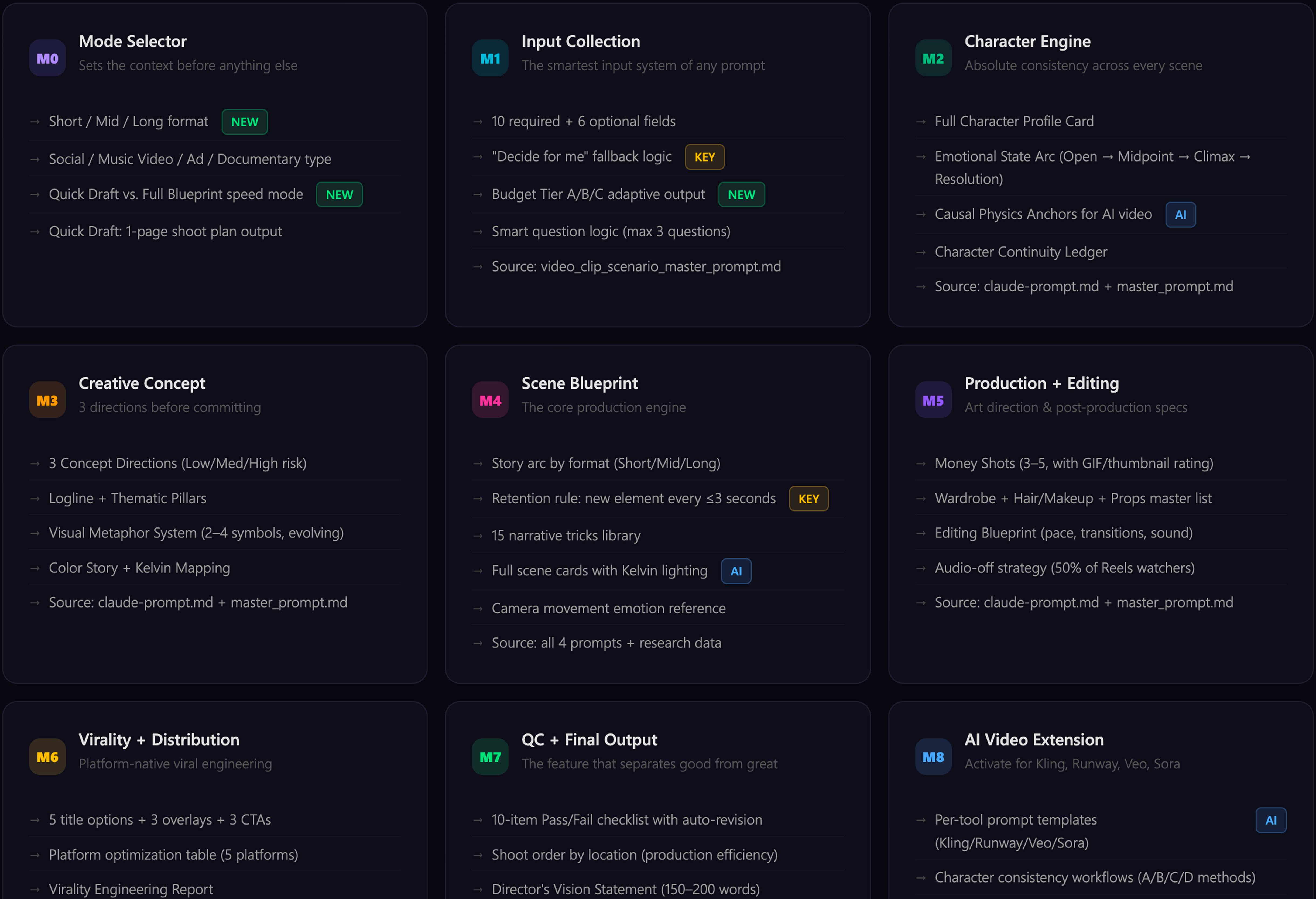
I researched cinematography language (camera movements → emotions), narrative theory (retention tricks, pacing science), and platform optimization (TikTok vs. YouTube vs. Instagram native formats). The result is a 7-module architecture split across 5 specialized agents:

Interactive Infographic

Master Video Scenario Prompt — Architecture v1.0

Agent A: Brief Intake Agent B: Creative Dev Agent C: Production Agent D: Distribution Agent E: QC + Output
System Identity Layer Role: director + cinematographer + strategist. Named references (Fincher, Kubrick, Villeneuve) for latent calibration. Quality non-negotiables.
M0 Mode Selector New Agent A
Short-form: ≤60s (TikTok, Reels)
Mid-form: 1-3min (YouTube, Brand)
Long-form: 3-10min (Music Video, Film)
Content type: Social Viral / Music Video / Ad / Documentary
Speed: Quick Draft vs Full Blueprint
M1 Input Collection Agent A
10 required + 6 optional fields
"Decide for me" fallback logic
Budget/gear adaptive layer
Smart question logic (max 3 follow-ups)
M2 Character Engine Agent B
Full Character Profile Card
Emotional State Arc
Continuity Ledger
Causal Physics Anchors for AI
M3 Creative Concept Agent B
3 Concept Directions (risk levels)
Logline + Thematic Pillars
Visual Metaphor System
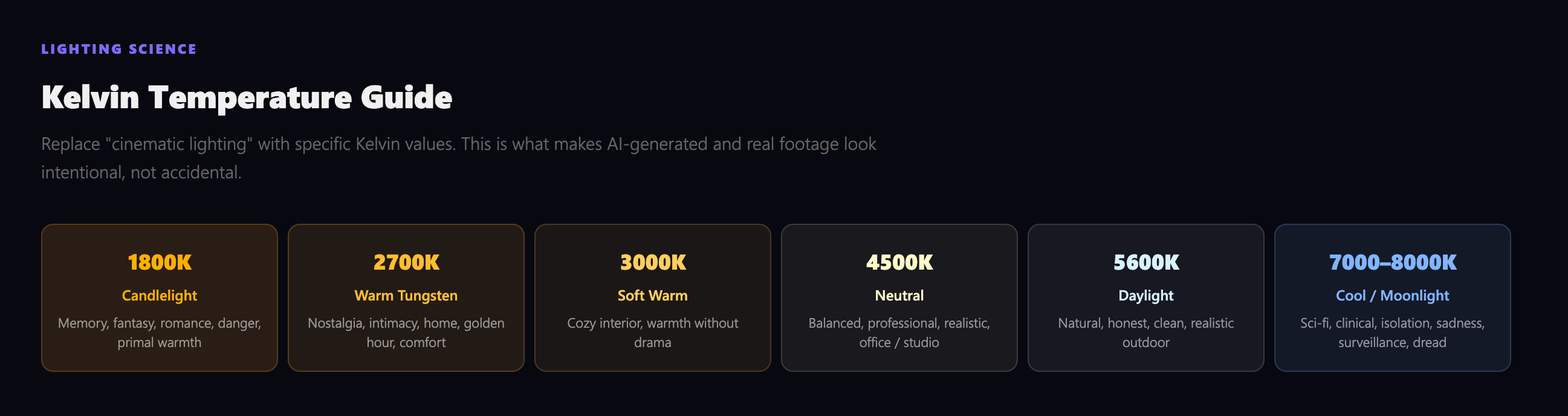
Color Story + Kelvin Mapping
M4 Scene Blueprint Agent C
Story arc by format
Retention: new element every ≤3s
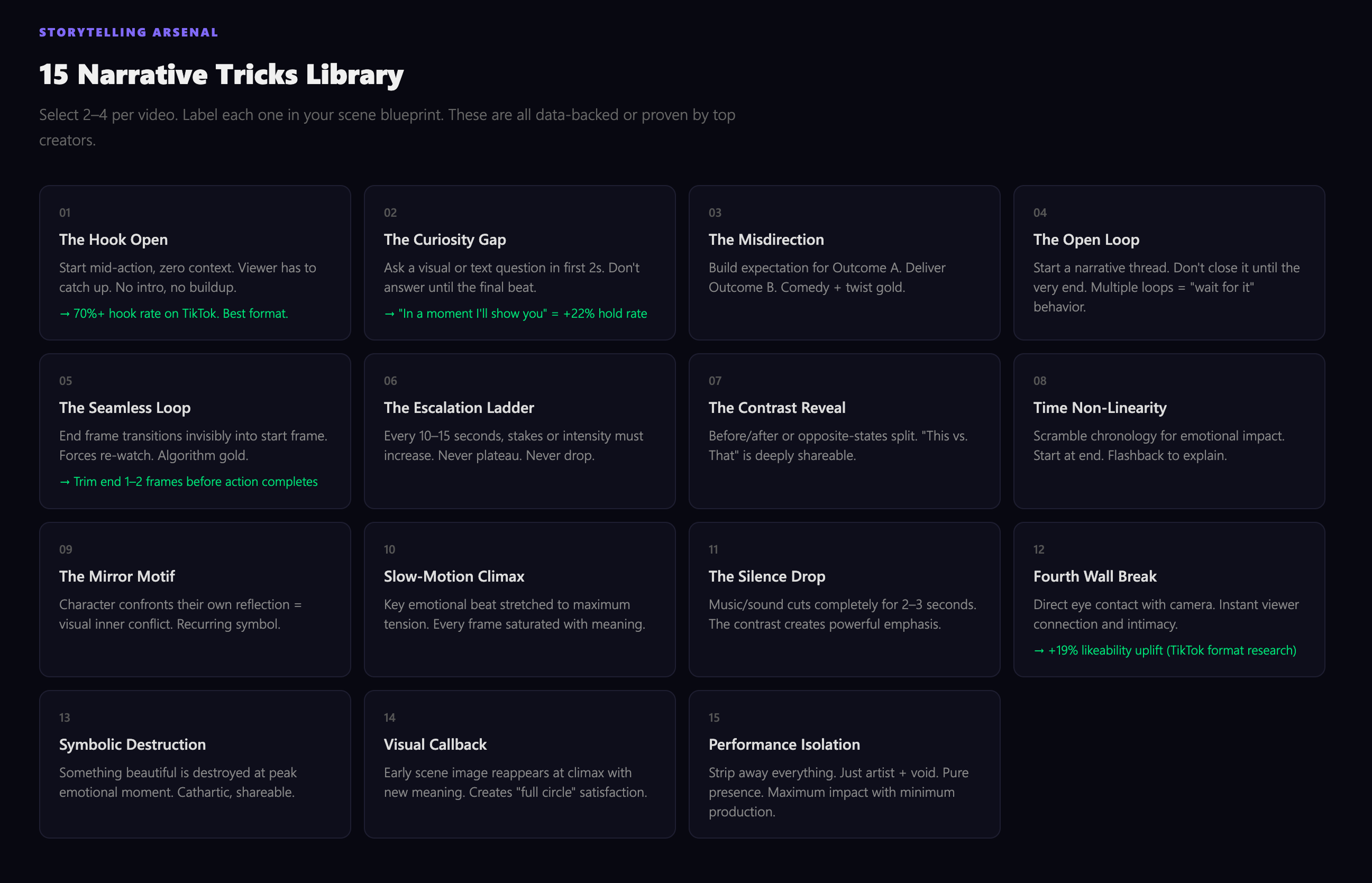
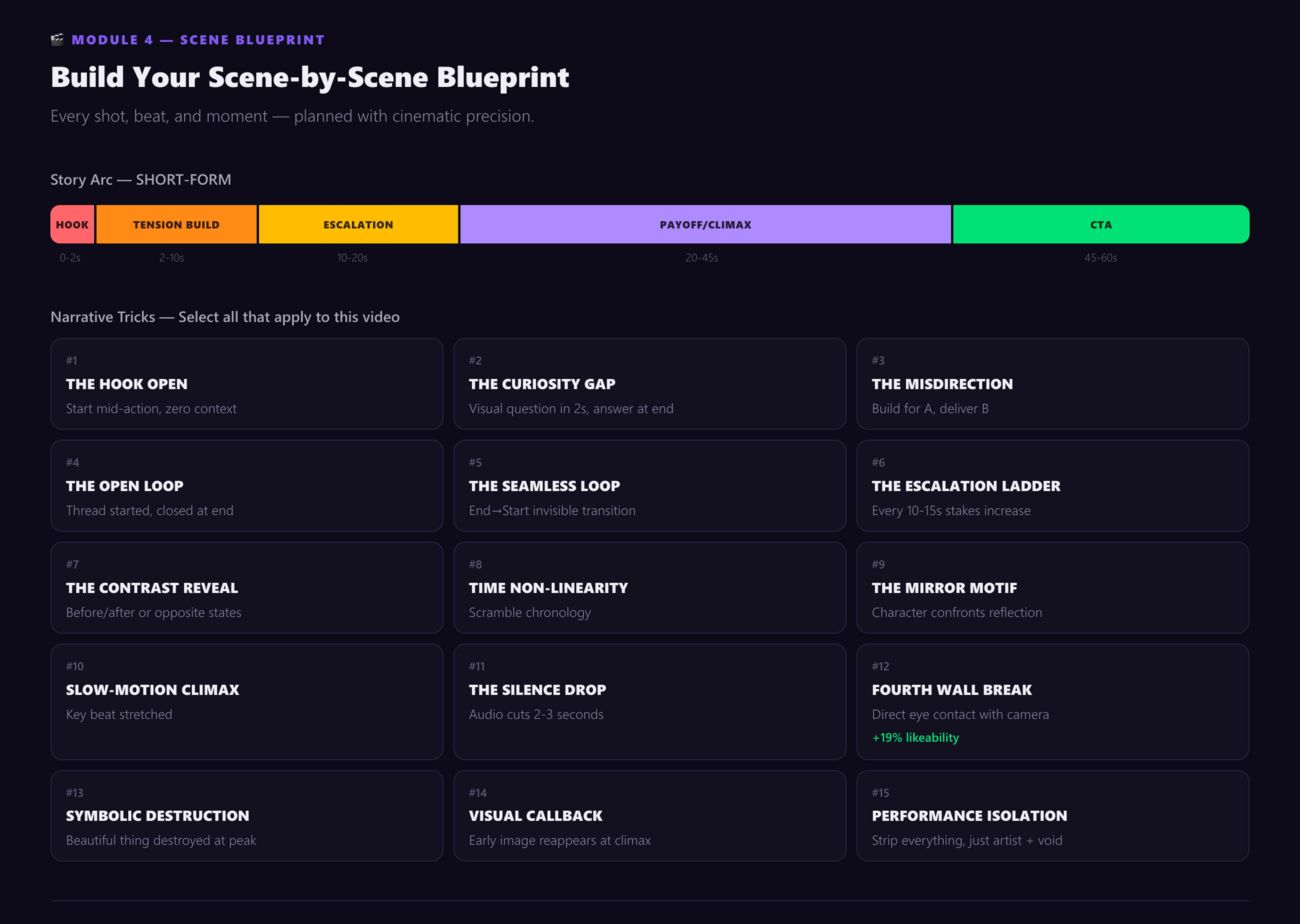
15 narrative tricks library
Kelvin lighting + camera emotion
M5 Production + Editing Agent C
Money Shots (3-5, GIF rated)
Wardrobe + Hair/Makeup
Editing Blueprint
Audio-off strategy
M6 Virality + Distribution Agent D
5 titles + 3 overlays + 3 CTAs
Platform optimization (5 platforms)
Thumbnail moment + shareable frame
M7 QC + Director's Note Enhanced Agent E
10-item Pass/Fail + auto-revision
Director's Vision Statement
Shoot order / day schedule New
Per-tool prompt templates (Kling/Runway/Veo/Sora)
Agent Pipeline Flow
A: Brief B: Creative C: Production D: Distribute E: QC
Agent E can trigger auto-revision loops back to any upstream agent.

Topic Exploration: Building the Knowledge Foundation

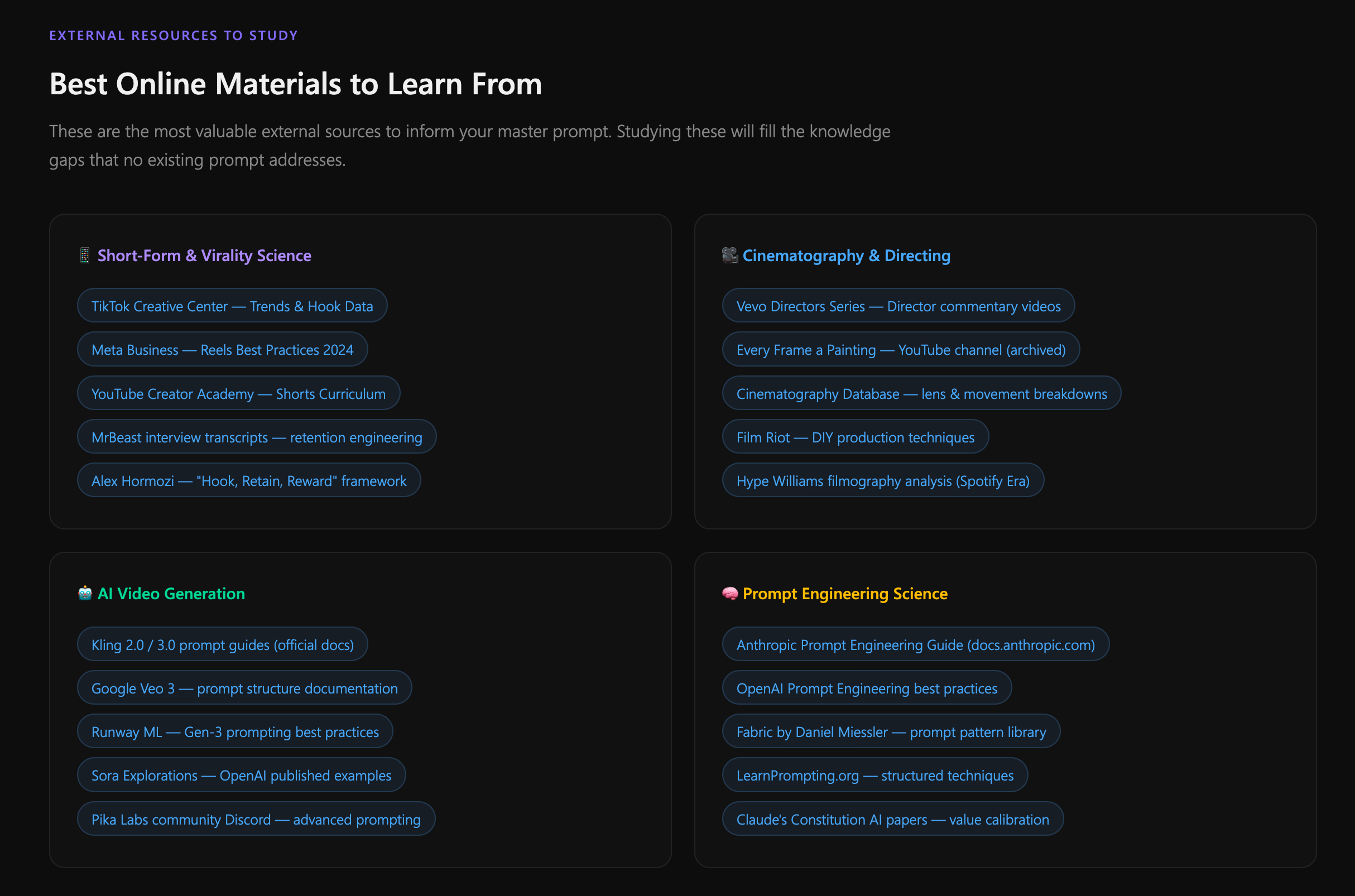
Before writing a single line of code, I immersed myself in the disciplines that would define the tool's intelligence: cinematography, narrative psychology, lighting science, and prompt engineering. Each topic became a module in the system's architecture.

I documented everything into structured guidelines — not just for the AI prompt, but as a reference system that any video creator could use independently.

System Architecture: 9 Modules Mapped

Cinematography & Narrative Research

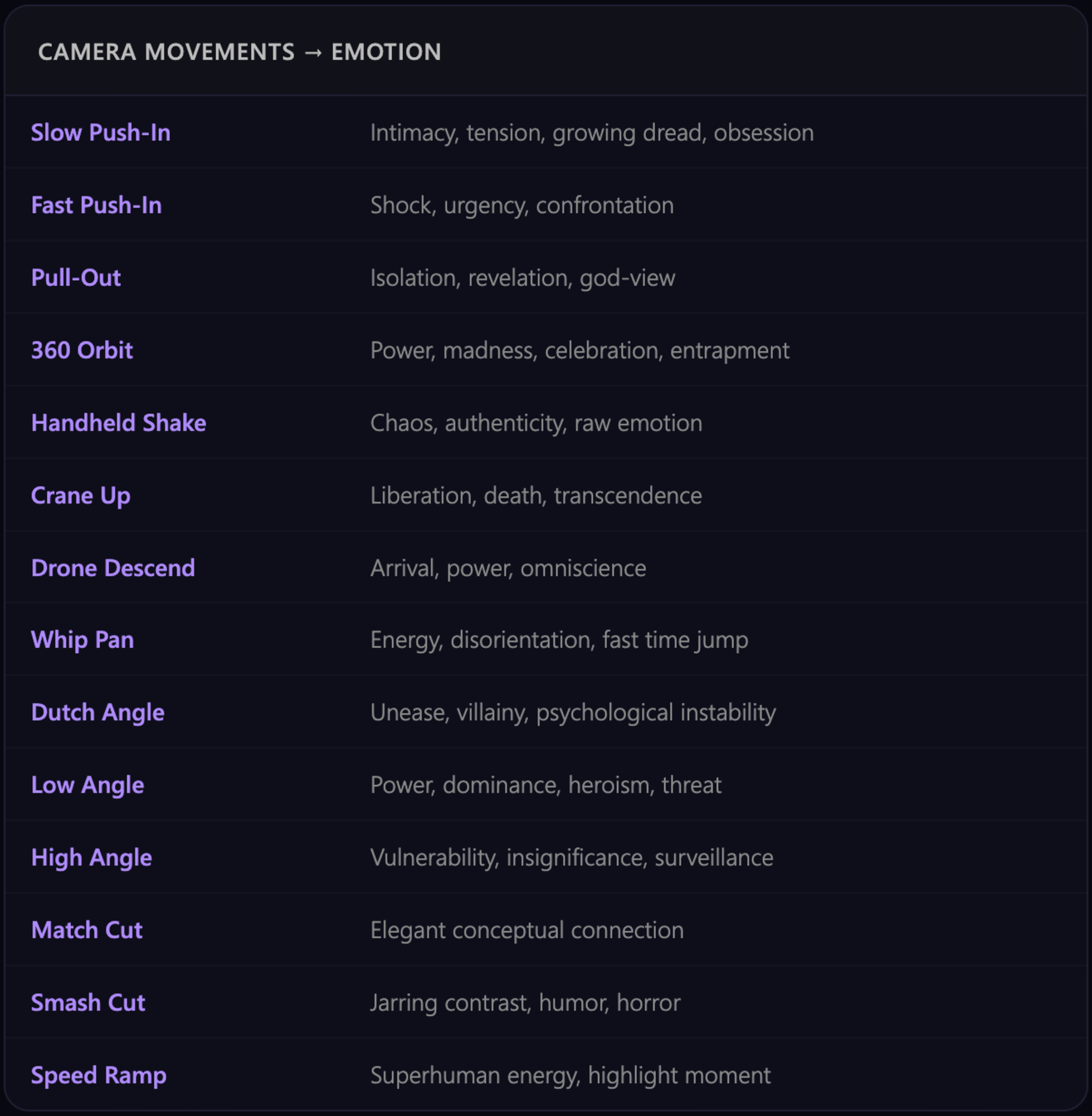
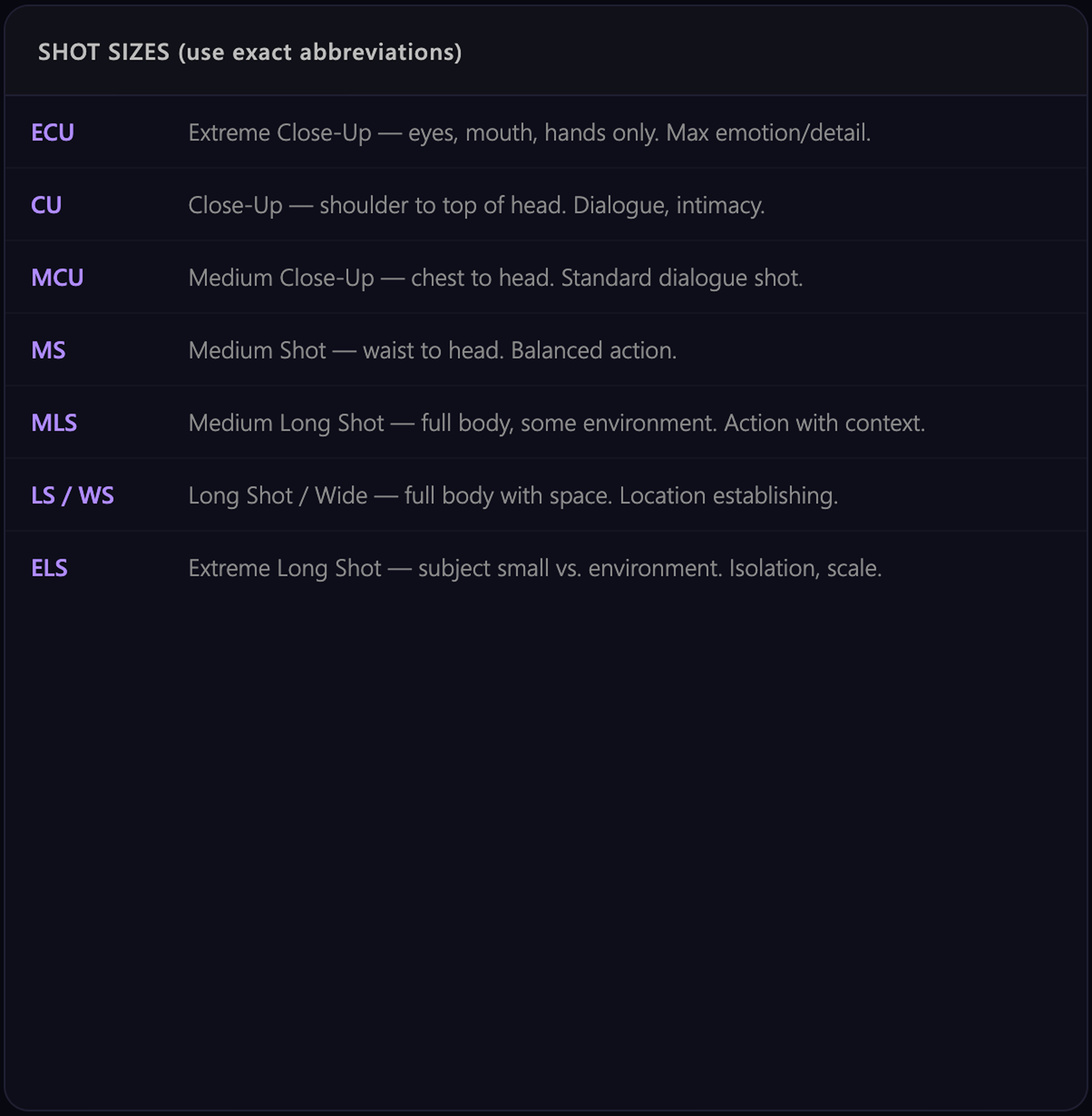
I studied how professional directors use camera language to create emotion, then codified these relationships into structured rules the AI could apply consistently across scenes.

Lighting Science & Resource Library

What I Built: From Prototype to Gemini-Powered v2

Version 1: Concept Validation

I shipped a working prototype to validate the core idea: users describe a video concept, define key parameters, and receive a multi-scene scenario with generation prompts.

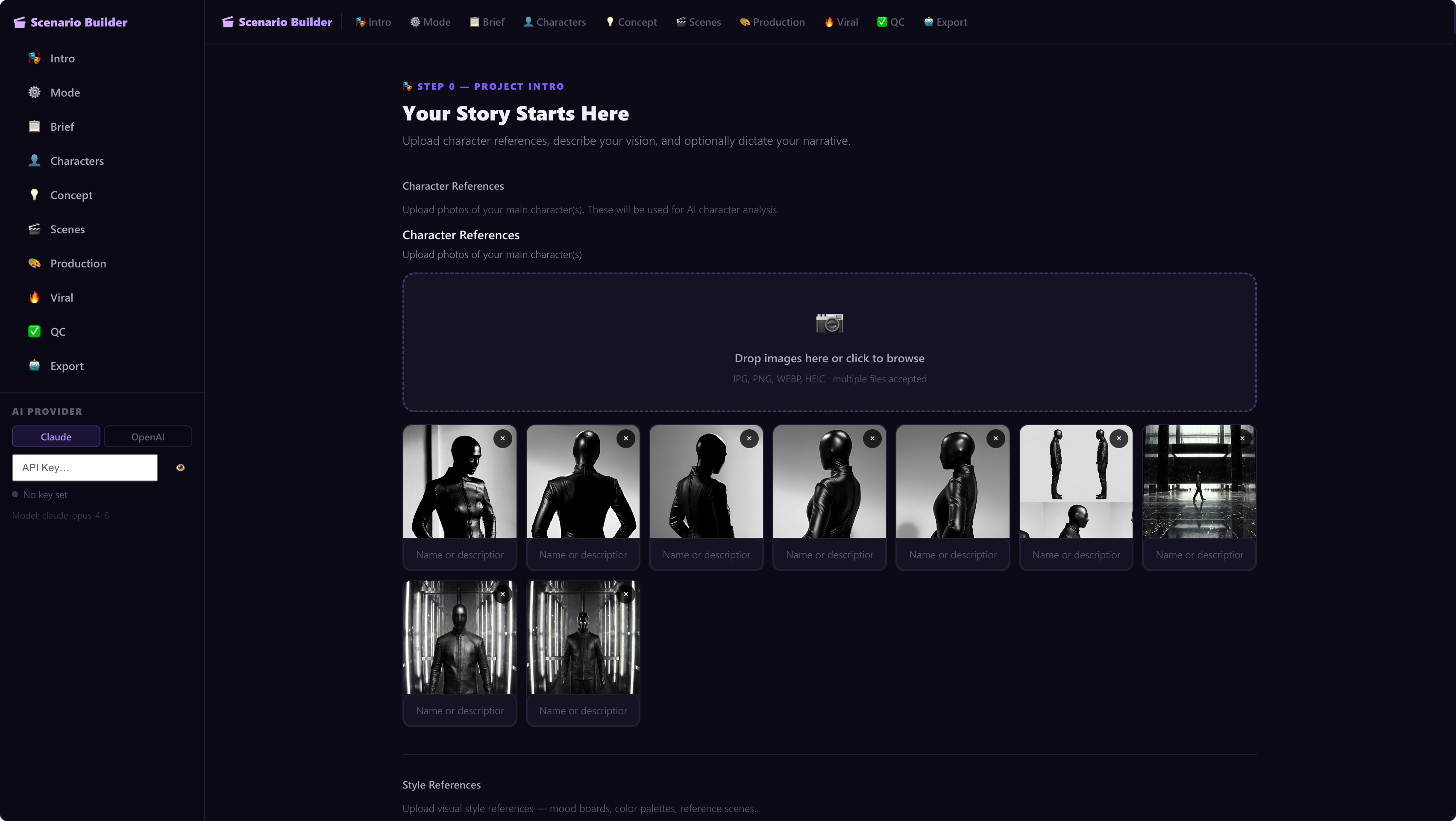
V1 interface: Purple/dark theme with sidebar navigation. Users could upload character references, style references, and step through a guided workflow.

  • 9 workflow steps (Intro → Music → Brief → Characters → Concept → Scenes → Production → Viral → QC)
  • Character reference upload system
  • Multi-paragraph scenario output
  • Basic scene list generation
Version 1 interface main view showing sidebar navigation, character upload area, and scenario generation workflow

Version 2: Complete Redesign with Modular Architecture

V1 taught me what worked. Users wanted speed, clarity, and production-ready outputs. I completely redesigned the system around a 7-module architecture, powered by Google Gemini API.

The 7-Module System

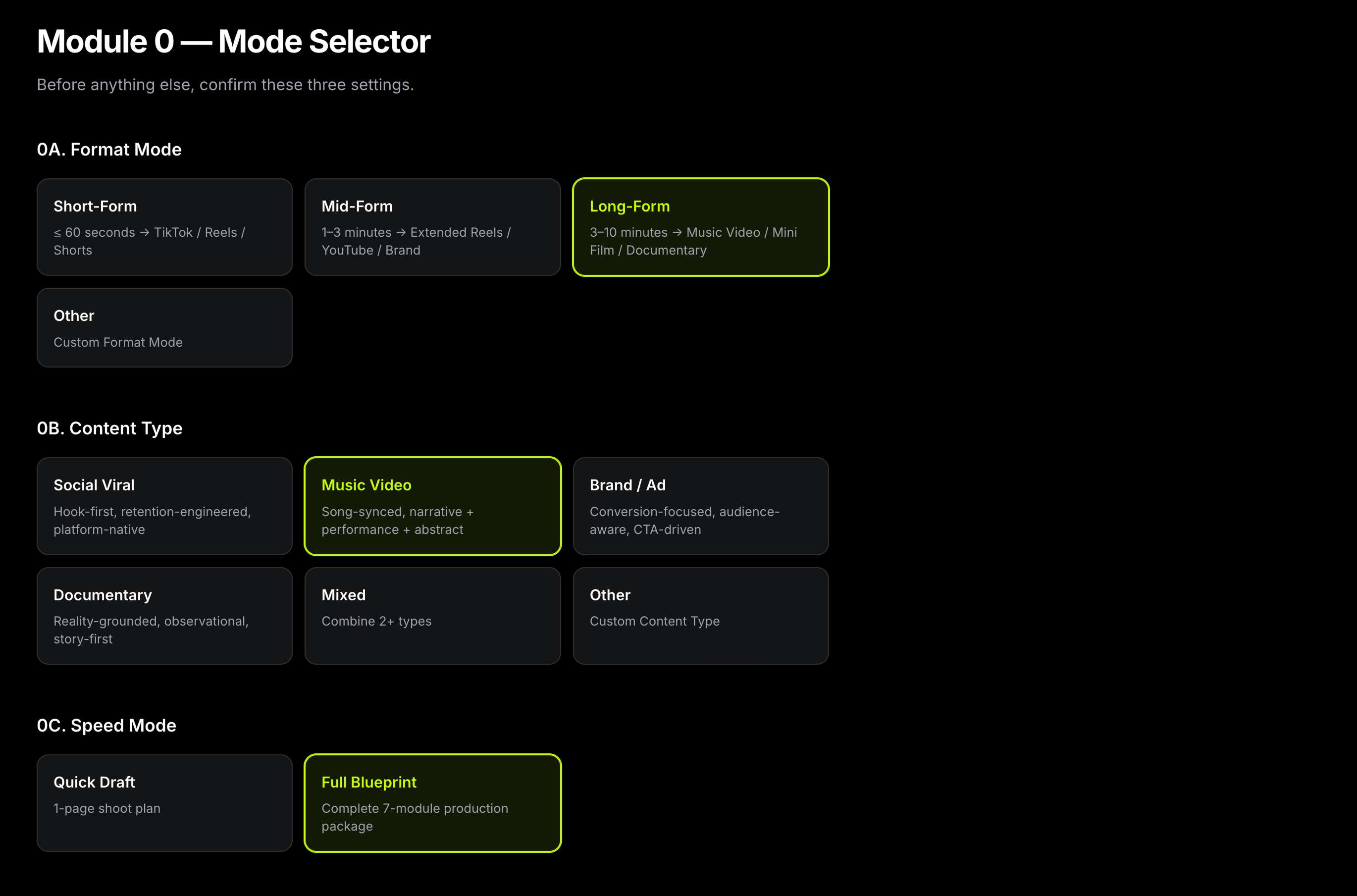
Module 0: Mode Selector Users choose: Format (Short/Mid/Long-Form), Content Type (Social Viral / Music Video / Brand Ad / Documentary), Speed Mode (Quick Draft / Full Blueprint). This sets the system's constraints upfront.
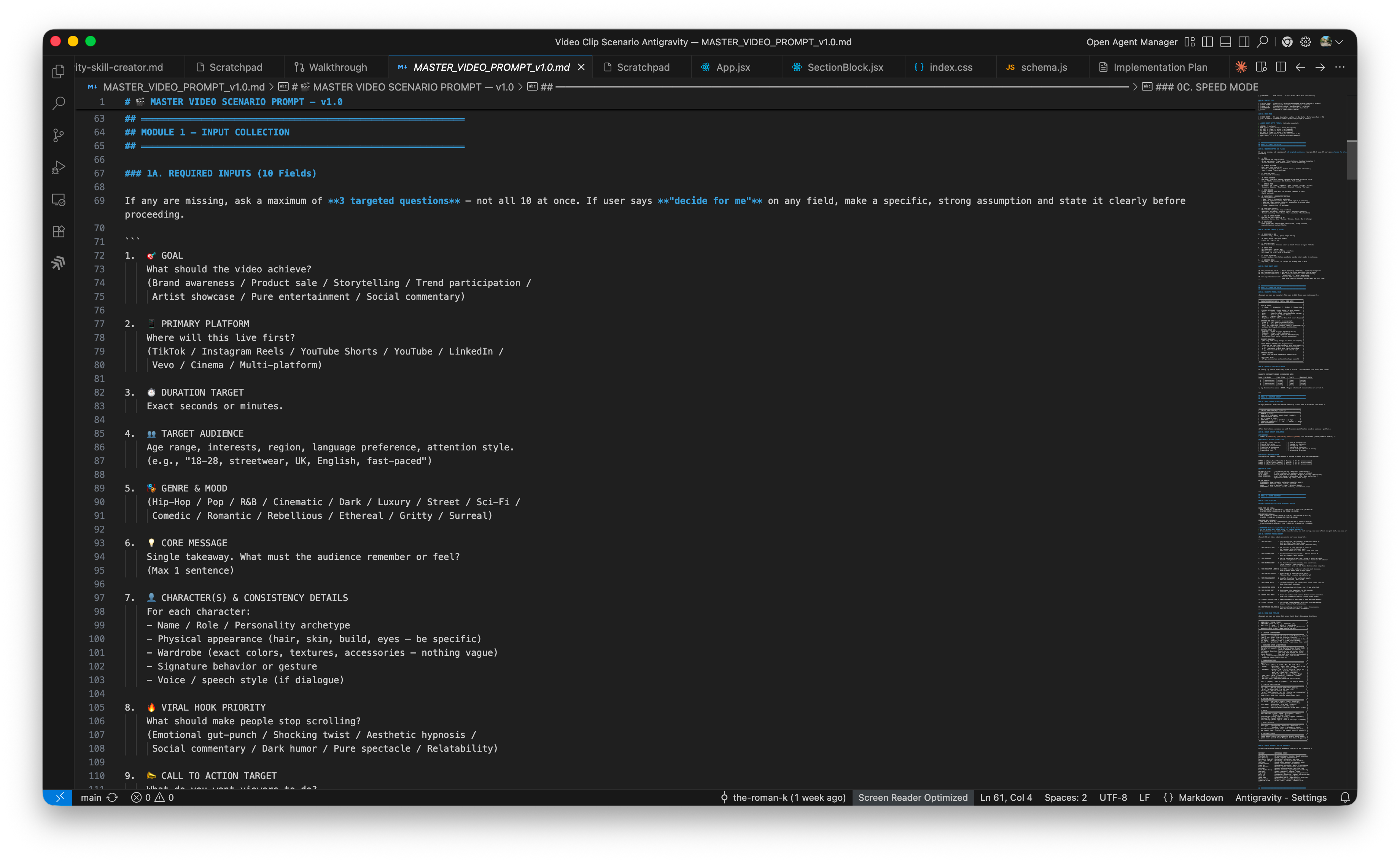
Module 1A: Required Inputs Goal, Primary Platform, Duration Target, Target Audience, plus main concept, narrative text, character references, style references. All required; no skip buttons that lower output quality.
Module 1B: Optional Inputs Music Vibe/BPM, Aspect Ratio, Budget Tier. Optional inputs unlock advanced features like music sync and platform-specific optimization.
Module 2-7: Character Engine, Concept, Scene Blueprint, Production, Virality, QC

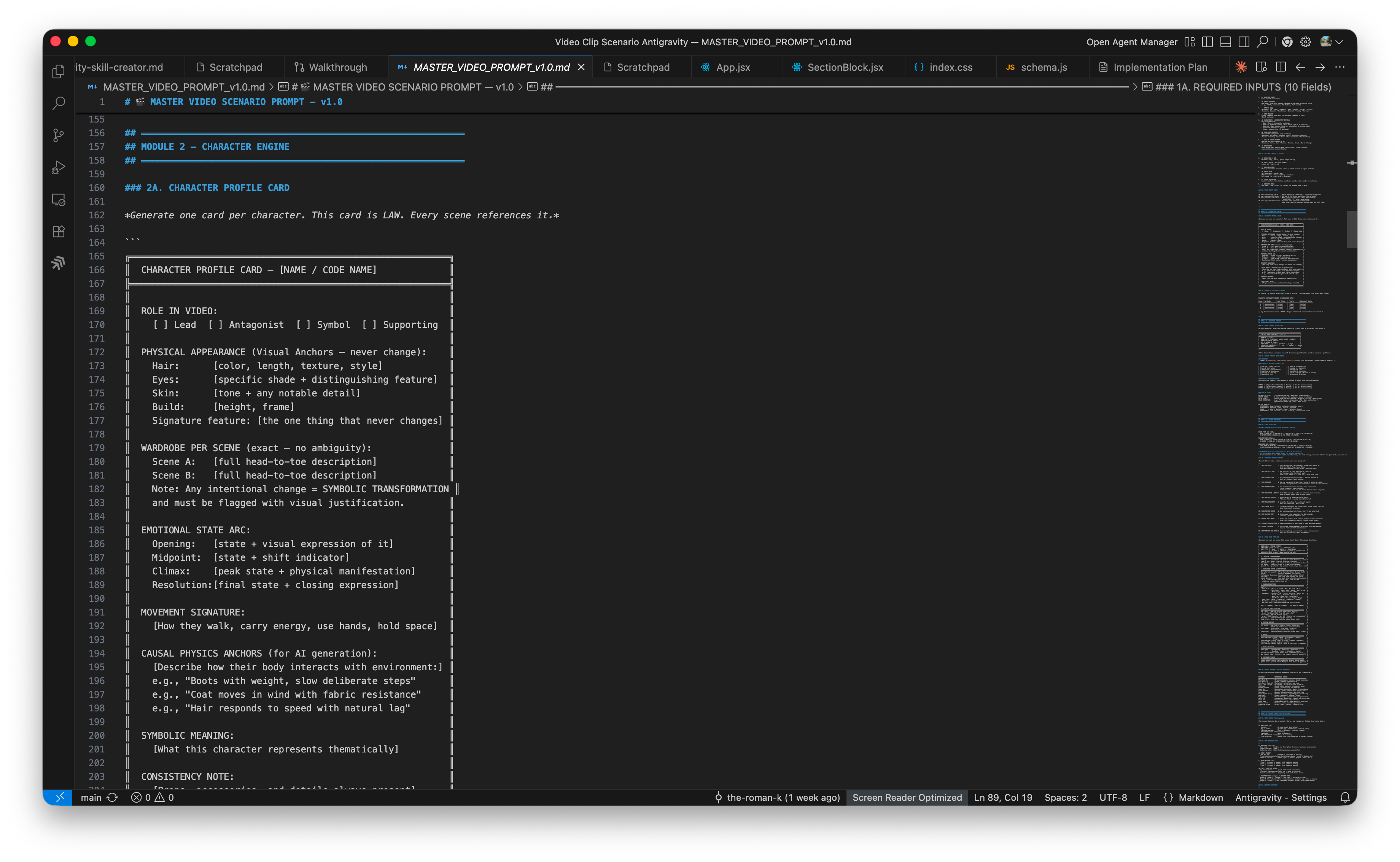
M2 (Character Engine): Full character profile cards with emotional arcs and "causal physics anchors" for AI video consistency.

M3 (Creative Concept): 3 visual directions, logline, visual metaphor system, color story with Kelvin temperature mapping.

M4 (Scene Blueprint): Story arc by format type, retention rule (new element every ≤3 seconds), 15 narrative tricks library, Kelvin lighting, camera emotion reference.

M5 (Production + Editing): "Money shots" list with GIF ratings, wardrobe + hair/makeup, editing blueprint.

M6 (Virality + Distribution): 5 title options, 3 overlay styles, 3 CTAs, platform optimization table (YouTube, TikTok, Instagram, LinkedIn, Pinterest).

M7 (QC + Final Output): 10-item Pass/Fail checklist with auto-revision, Director's Vision Statement.

Module 0: Mode selector interface showing Format, Content Type, and Speed Mode options

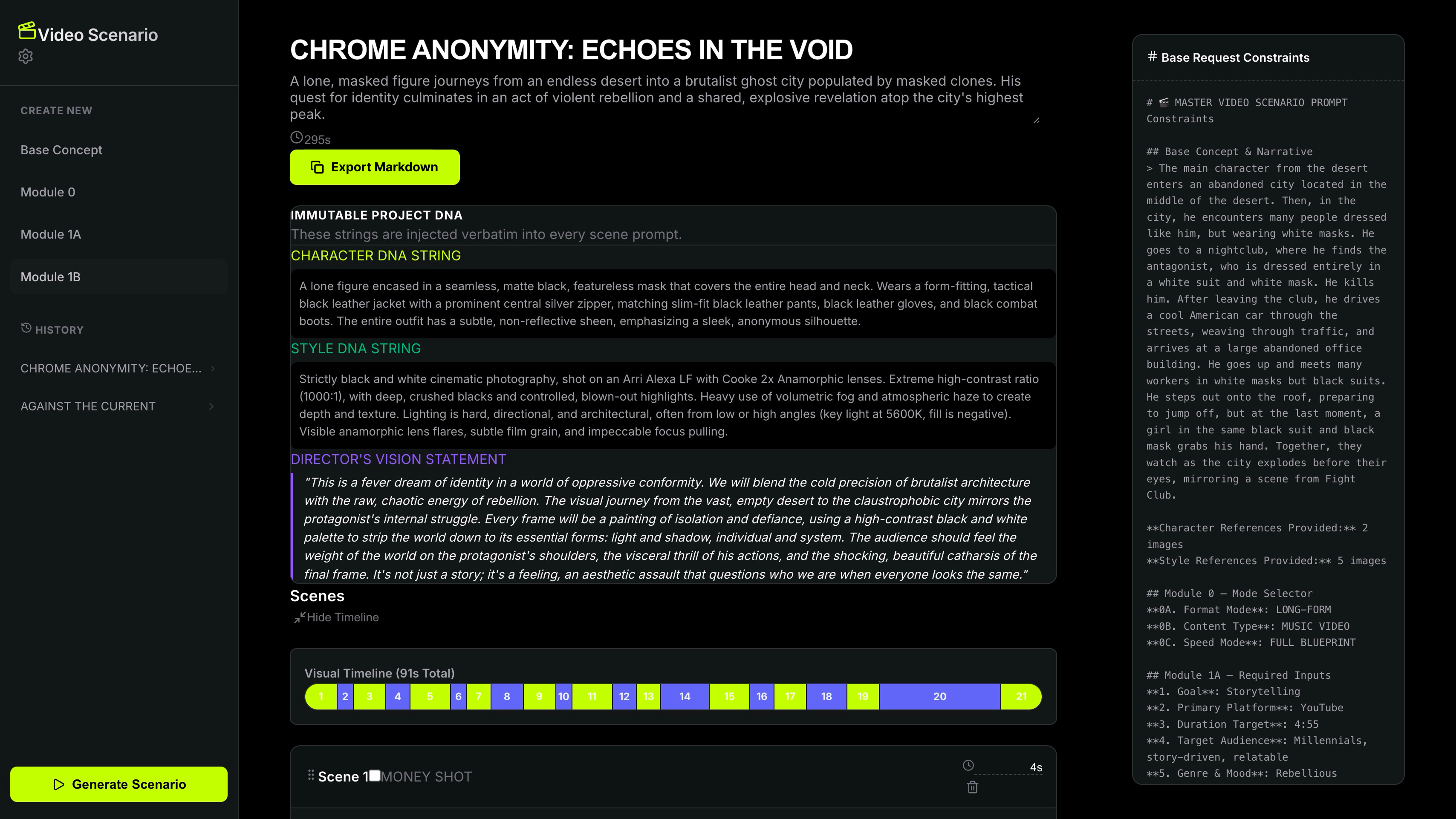
Output: Structured Scenario

Project DNA

Immutable central metadata that constrains all scenes and keeps the entire project coherent.

Character DNA

Reusable character identity rules that maintain consistency across every generated scene.

Style DNA

Visual language rules — color story, Kelvin mapping, and aesthetic constraints for AI generation.

Director's Vision

One sentence that explains the entire project — the creative north star for every decision.

Visual Timeline

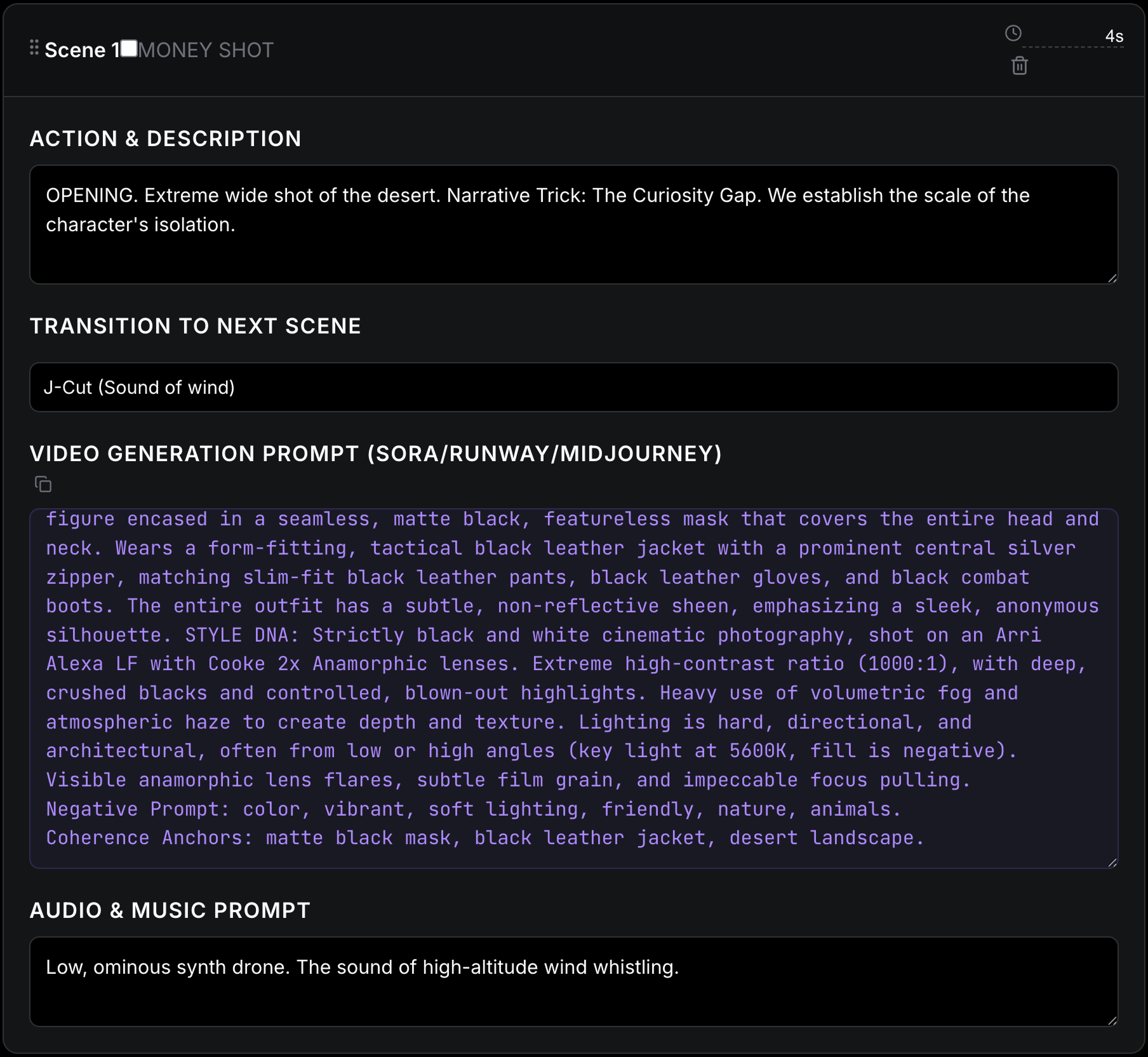
Numbered scenes with actions, transitions, generation prompts, and audio guidance.

Supporting Tools & Documentation

Beyond the app, I created:

  • Cinematic Prompt Guidelines: Camera movements mapped to emotion (Slow Push-In = intimacy/tension, 360 Orbit = power/madness, Dutch Angle = unease)
  • Color Temperature Guidance: Kelvin scale for consistent visual mood
  • Interactive Quality Checklist: 10-item pass/fail for narrative clarity, transitions, visual consistency, prompt quality
  • User Guidelines (8 pages): Documented the full modular architecture for creators
Version 2 detailed output view showing scene breakdown with action description, transition, video generation prompt, and audio guidance

Development: Engineering the Master Prompt

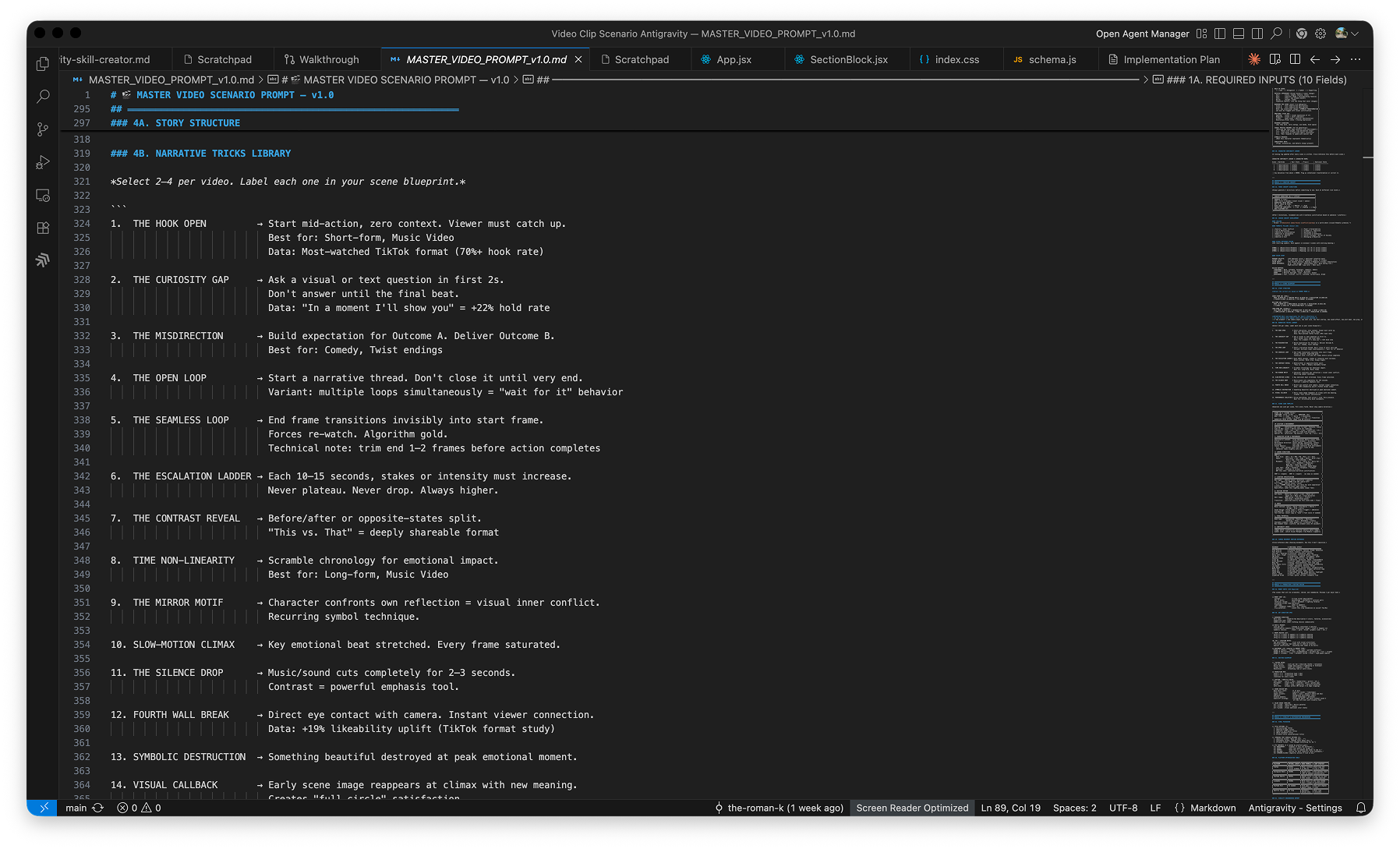
The core of this tool is a master video scenario prompt — a carefully engineered instruction set that guides the AI through the entire scenario generation pipeline. Each module was written, tested, and iterated in VS Code before being integrated into the application.

Below are snapshots from the actual development process, showing the prompt architecture being built module by module.

Result: Working Prototype with Measurable System

I shipped a fully functional prototype that demonstrates the concept. The system architecture is production-ready and extensible.

8 Modules in architecture
15 Narrative tricks documented
10 QC checklist items
5 Platform optimization targets
Scene-by-scene prompt generation

A creator who would spend 6+ hours writing individual scene prompts, managing character consistency, and optimizing for platform now receives a complete, production-ready scenario in minutes.

What the Output Enables

Version 2 outcome screen showing generated scenario overview with Project DNA, character profiles, and scene list

The AI Layer: How AI Shaped Every Decision

This project is not a "how I'd build this if I used AI today" case study. I actively used AI throughout, and it fundamentally shaped the system.

AI in Research

Tested four AI environments (ChatGPT, Claude, Codex, AntiGravity) head-to-head across scenario generation. This comparison became the research foundation for the entire product.

AI as Design Material

Treated Gemini API capabilities as design constraints. The 7-module architecture was shaped by what AI could reliably output. The Master Scenario Prompt is itself a design artifact — engineering how AI thinks about video.

AI in Production

Gemini API generates structured JSON outputs: Project DNA, Character DNA, Scene blueprints, optimization suggestions. The API handles narrative synthesis; the UI presents it clearly.

Evidence of AI Impact

  • 4 AI environments tested: Research grounded in comparative evaluation, not guesswork
  • Prompt architecture designed: The system treats prompt structure as a design artifact, not a hack
  • Gemini API integration: v2 powered by generative AI, not templates
  • Scene-by-scene prompt generation: Each scene receives a custom, AI-generated prompt optimized for its platform

Next Steps

This project demonstrates my approach to designing with and for AI: rigorous research, system thinking, and outcomes that matter.

Let's Talk About Your Project